
Download the Stake App for Android & iOS and Claim Your Welcome Bonus
The Stake PWA gives you instant access to sports betting and casino games directly from your mobile browser, with no bulky installation required. Place bets on cricket, football, and kabaddi, or spin top casino titles, all from one platform. Every week, Stake runs a USD 75,000 Weekly Raffle open to all eligible players. Add the app to your home screen now and get started.
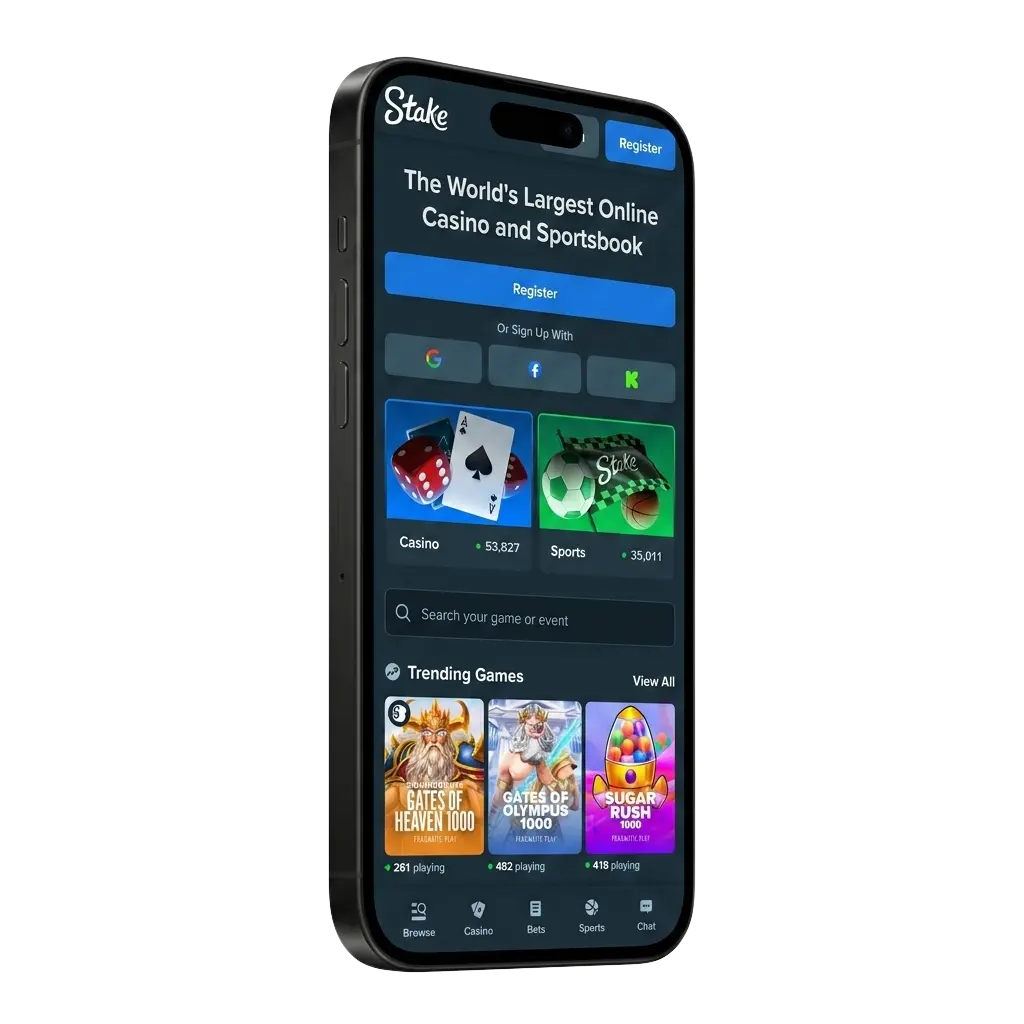
Stake App at a Glance
The Stake app is a Progressive Web App (PWA) built for mobile browsers on both Android and iOS. It covers sports betting, live casino, slots, and original games under a single login. Here is a quick overview of everything you need to know before installing.
| App Category | Sports Betting & Online Casino |
| Licence | Curaçao eGaming (Licence No. 8048/JAZ) |
| Supported OS | Android 8.0 and above; iOS 14.0 and above |
| Latest Version | PWA (auto-updated via browser) |
| Release Date | Stake launched in 2017; PWA available continuously updated |
| Download Cost | Free |
| App Languages | English, Hindi, and 14 additional languages |
| Supported Countries | Available internationally, including India |
| Welcome Bonus – Sports | Weekly Raffle – USD 75,000 (see Promotions page for full terms) |
| Welcome Bonus – Casino | Weekly Raffle – USD 75,000 (see Promotions page for full terms) |
| Bet Types | Single, Accumulator, System, Live/In-Play |
| Customer Support | 24/7 Live Chat and email support |
A Look at the Stake App Interface
The Stake PWA uses a dark-themed, minimal layout that keeps navigation fast and focused, with sports, casino, and account sections reachable in two taps or fewer. Every screen loads quickly on mobile connections, and the bottom navigation bar stays fixed so you never lose your place mid-session.
Install the Stake PWA on Android in 5 Steps
The Stake PWA installs directly through your mobile browser without needing the Google Play Store. There is no APK file to sideload and no extra permissions to grant. Follow these five steps to get the app on your Android home screen in under two minutes.
Step 1: Tap the Android Download Button on This Page
Tap the “Download App for Android” button on this page to open Stake in your mobile browser.
Step 2: Log In or Create Your Account
Sign in to your existing account, or register a new one if you do not have an account yet.
Step 4: Select “Add to Home Screen”
Tap “Add to Home Screen” from the menu, then confirm by tapping “Add” in the prompt that appears.
Step 5: Open the App and Start Playing
Once the Stake icon appears on your home screen, tap it to log in and begin placing bets or playing casino games immediately.
Android Devices Compatible with the Stake PWA
The Stake PWA runs on any Android device that supports Chrome 80 or a later browser version. It has been tested and confirmed to work across all major Android brands sold in India. The table below lists popular compatible models.
| Brand | Compatible Models |
|---|---|
| Samsung | Galaxy S23, S24, A54, A34, M34, F15 |
| Sony | Xperia 1 V, Xperia 5 V, Xperia 10 V |
| Huawei | P60 Pro, Nova 11, Mate 50 Pro |
| OnePlus | 12, 12R, Nord CE 4, Nord 4 |
| Oppo | Reno 12, Find X7, A79 5G |
| Pixel 8, Pixel 8 Pro, Pixel 8a | |
| Xiaomi | 14, Redmi Note 13, Redmi 13C |
| Poco | X6 Pro, M6 Pro, F6 |
Android System Requirements for the Stake PWA
The Stake PWA is lightweight by design because it runs in your browser rather than as a standalone application. Any mid-range Android device from 2019 onward will run it without issues. Storage demand is minimal since no app binary is downloaded to your device.
| Requirement | Specification |
|---|---|
| Operating System | Android 8.0 (Oreo) or higher |
| RAM | 2 GB minimum; 4 GB recommended |
| Storage Space | 100 MB free (browser cache only; no APK stored) |
| Browser | Google Chrome 80 or later |
Install the Stake PWA on iOS in 5 Steps
iPhone and iPad users can add the Stake PWA to their home screen through Safari in under two minutes. No App Store download is needed, and the process works on any iPhone running iOS 14 or later. Follow the steps below for a complete walkthrough.
Step 1: Tap the iOS Download Button on This Page
Tap the “Download App for iOS” button on this page to open Stake in Safari on your iPhone or iPad.
Step 2: Log In or Create Your Account
Sign in to your existing account, or register a new one if you do not have an account yet.
Step 4: Select “Add to Home Screen”
Scroll through the share sheet, tap “Add to Home Screen”, then confirm by tapping “Add” in the top-right corner.
Step 5: Open the App and Start Playing
Tap the Stake icon that now appears on your iPhone home screen, log in, and start betting on sports or playing casino games right away.
Apple Devices Compatible with the Stake iOS PWA
The Stake PWA works on all iPhones and iPads running iOS 14.0 or later through the Safari browser. Apple’s WebKit engine on iOS 14 and above fully supports the PWA standard required for home screen installation. The table below covers the latest compatible Apple devices.
| Brand | Compatible Models |
|---|---|
| Apple | iPhone 16, iPhone 16 Pro, iPhone 16 Pro Max |
| Apple | iPhone 15, iPhone 15 Plus, iPhone 15 Pro, iPhone 15 Pro Max |
| Apple | iPhone 14, iPhone 14 Plus, iPhone 14 Pro, iPhone 14 Pro Max |
| Apple | iPhone 13, iPhone 13 Mini, iPhone 13 Pro, iPhone 13 Pro Max |
| Apple | iPhone 12, iPhone 12 Mini, iPhone 12 Pro |
| Apple | iPad Pro (M4, 2024), iPad Air (M2, 2024), iPad Mini (7th gen) |
iOS System Requirements for the Stake PWA
The Stake PWA runs entirely within Safari on iOS, which means it places no additional load on your device beyond what the browser itself requires. Any iPhone released after 2018 has more than enough processing power to run the platform without performance drops. No extra storage is consumed beyond browser cache files.
| Requirement | Specification |
|---|---|
| Operating System | iOS 14.0 or higher |
| RAM | 2 GB minimum; 3 GB recommended |
| Storage Space | 100 MB free (Safari cache only; no app binary stored) |
| Browser | Safari (required for "Add to Home Screen" on iOS) |
Stake on Desktop and Laptop (PC Version)
No dedicated desktop software is required to access Stake on a PC or laptop. The full platform is available through any modern browser, including Chrome, Firefox, Edge, and Safari on macOS. The desktop layout expands the sportsbook and casino views into a multi-column format, making it easier to monitor multiple markets or games at once. Live bet tracking and in-play statistics panels are prominently displayed on wider screens, which is a clear advantage for serious sports bettors. The PC version supports all the same payment methods and bonuses as the mobile PWA, with no feature restrictions.
How to Register on Stake via the PWA
Creating an account through the Stake PWA takes under three minutes. All fields are mobile-optimised, so you can complete registration entirely from your phone without switching to a desktop.
- Open the Stake PWA from your home screen or browser and tap “Register”.
- Enter a valid email address and create a secure password.
- Fill in your username, date of birth, and country of residence (select India).
- Agree to the Terms of Service and confirm you are 18 years of age or older.
- Check your inbox for a verification email and click the confirmation link to activate your account.
Bonuses Available to Mobile Players on Stake
All promotions on Stake are fully accessible through the PWA, with no mobile-exclusive restrictions on eligibility. The Promotions page inside the app displays every active offer with its current terms. New and existing players can participate in recurring weekly promotions without needing to be on desktop. Bonus credits and raffle entries are applied automatically to your account after qualifying activity. Check the Promotions section in the app regularly, as new offers are added on a rolling basis.
Weekly Raffle – USD 75,000
Stake’s flagship recurring promotion gives the entire player community a share of a USD 75,000 prize pool every week.
| Detail | Information |
|---|---|
| Type | Weekly Prize Draw |
| Total Prize Pool | USD 75,000 per week |
| How to Enter | Wager on any eligible casino game or sports market to earn raffle tickets |
| Ticket Allocation | 1 raffle ticket per USD 1,000 wagered |
| Terms and Conditions | Players must have a verified account; one entry per USD 1,000 wagered; prizes credited within 72 hours of the draw |
| Validity Period | Runs every week; the draw takes place every Sunday |
| Eligible Games | All casino games and sportsbook markets on Stake |
Keeping the Stake App on the Latest Version
Because Stake operates as a PWA, updates are applied automatically on the server side every time you open the app in your browser. There is no manual update process for Android or iOS users. If you want to confirm you are running the latest version, close the Stake tab in your browser completely, reopen it, and the browser will fetch the newest version automatically. Clearing your browser cache before reopening also ensures no outdated files are loaded. On Android, long-press the Stake icon on your home screen and select “Open in browser” if prompted, to force a fresh load.
Why Staying on the Latest App Version Is Important
Each PWA update Stake pushes may include new security patches that protect your account and payment data from emerging threats. New features, such as additional payment methods or updated sports markets, are only available after the browser loads the latest version. Performance fixes in each update reduce page load times and prevent session interruptions during live betting. Running an outdated cached version can also cause bet placement errors or incorrect odds display, both of which are resolved by refreshing to the current build.
How to Place a Bet on Stake via the App
Placing a bet through the Stake PWA takes four straightforward steps from login to confirmation.
Open the Stake PWA and navigate to the Sportsbook section
Open the Stake PWA and navigate to the Sportsbook section from the bottom navigation bar.
Select your sport and market
Select your sport (e.g., Cricket, Football, Kabaddi), choose a league or tournament, and tap the market you want to bet on.
Enter your stake amount
Enter your stake amount in the bet slip that appears at the bottom of the screen.
Review and confirm your wager
Review the odds and potential payout, then tap “Place Bet” to confirm the wager.
How to Remove the Stake PWA from Your Device
On Android, long-press the Stake icon on your home screen, drag it to the “Remove” option that appears at the top of the screen, and release. On iOS, long-press the Stake icon until it enters jiggle mode, tap the minus sign that appears on the icon, and confirm deletion. Removing the PWA shortcut does not delete your Stake account or any associated data; you can reinstall it at any time by following the original installation steps.
How to Log In to Stake via the PWA
Logging in through the Stake PWA requires only your registered credentials and takes under 30 seconds.
- Tap the Stake icon on your home screen or open Stake in your mobile browser.
- Tap the “Login” button displayed on the homepage.
- Enter your registered email address or username in the first field.
- Enter your account password in the second field.
- If Two-Factor Authentication (2FA) is enabled on your account, enter the 6-digit code from your authenticator app.
- Tap “Sign In” to access your account dashboard and start playing.
Core Features of the Stake App
The Stake PWA consolidates sports betting, live casino, slots, and original games into a single platform accessible from any mobile browser. The sportsbook covers over 40 sports with pre-match and live markets running 24 hours a day. The casino library includes thousands of titles from over 60 verified software providers. Deposits and withdrawals are processed through multiple cryptocurrency options with no minimum withdrawal fee charged by Stake. Player accounts include full transaction history, responsible gambling tools, and customisable notification settings. The platform also supports cryptocurrency payments natively, making it one of the few online betting sites to offer Bitcoin deposits without a third-party processor.
Live Betting on the Stake App
Stake’s in-play sportsbook is available 24 hours a day across more than 40 sports, including cricket, football, tennis, and kabaddi. Live odds update in under one second during active matches, keeping your bet slip aligned with the current state of play. The in-play interface displays a live match tracker, current score, and key match events directly on the betting screen. Over 1,000 live events are typically available simultaneously during peak hours, covering Indian Premier League (IPL) matches, UEFA Champions League fixtures, and international tennis tournaments. Cash-Out is available on selected live markets, letting you settle a bet before the event ends. Live streaming is available for selected sports events directly within the app, subject to account activity requirements. The fixed bottom navigation bar keeps the bet slip accessible at all times without covering the live odds display.
Casino Games on the Stake App
The Stake casino library contains thousands of games across slots, table games, live dealer, and exclusive Stake Originals. Software providers on the platform include Pragmatic Play, Evolution Gaming, Hacksaw Gaming, Relax Gaming, and over 60 others. Stake Originals, such as Crash, Dice, Mines, and Plinko, are built in-house and load instantly with provably fair algorithms. Live dealer tables from Evolution Gaming cover Baccarat, Roulette, Blackjack, and the live game show Crazy Time with no delay in video feed. Popular Indian-friendly titles such as Teen Patti and Andar Bahar are available in the live casino section. Games load directly within the PWA browser window with no additional software required. The lobby can be filtered by provider, category, or volatility to find your preferred game in seconds.
Deposit Options on the Stake App
Stake accepts cryptocurrency deposits exclusively, processing them without third-party payment intermediaries. Deposits are confirmed on-chain, meaning processing time depends on the blockchain network rather than Stake’s internal systems. Bitcoin (BTC) deposits typically confirm in 10 to 30 minutes; Ethereum (ETH) and Tron (TRX) confirm in under 5 minutes under normal network conditions. There is no deposit fee charged by Stake, though standard blockchain network fees apply. Indian players commonly use USDT (TRC-20) for near-instant deposits at minimal network cost. The deposit screen in the app generates a unique wallet address per transaction for added security.
| Detail | Information |
|---|---|
| Available Payment Methods | BTC, ETH, LTC, XRP, DOGE, TRX, USDT (ERC-20 and TRC-20), BNB, and others |
| Minimum Deposit | Varies by currency (e.g., approx. USD 1 equivalent in crypto) |
| Maximum Deposit | No maximum set by Stake |
| Transaction Security | On-chain verification; unique deposit address per transaction |
| Processing Time | Under 5 minutes for TRX/USDT (TRC-20); 10–30 minutes for BTC |
Withdrawal Options on the Stake App
Withdrawals on Stake are processed to the same cryptocurrency wallet used for deposits, in line with anti-money laundering (AML) compliance standards. There is no withdrawal fee charged by Stake; only the standard blockchain network fee applies. Most cryptocurrency withdrawals are approved within minutes, with Bitcoin withdrawals completing in under 30 minutes under normal network conditions. Stake does not impose a daily withdrawal limit for verified accounts in good standing. The withdrawal form inside the PWA requires only your destination wallet address and the withdrawal amount. All withdrawals above a threshold set per currency may require identity verification (KYC) before processing.
| Detail | Information |
|---|---|
| Available Withdrawal Methods | BTC, ETH, LTC, XRP, DOGE, TRX, USDT (ERC-20 and TRC-20), BNB, and others |
| Minimum Withdrawal | Varies by currency (approx. USD 1 equivalent) |
| Maximum Withdrawal | No maximum set for verified accounts |
| Transaction Security | AML-compliant; destination wallet verification required |
| Processing Time | Under 10 minutes for TRX/USDT; under 30 minutes for BTC |
User Profile Management on the Stake App
Your Stake account dashboard is accessible from the profile icon in the top-right corner of the PWA. The account overview displays your current balance in your chosen cryptocurrency, along with a real-time conversion to USD. The full transaction history is available under “Wallet”, filterable by date range and transaction type (deposit, withdrawal, or bonus). Personal details, including email address and password, can be updated directly from the profile settings page. Responsible gambling tools, including deposit limits, loss limits, and session time limits, are located under “Settings” in the account menu. KYC document uploads for identity verification are managed from the same settings area. Two-Factor Authentication (2FA) can be enabled or disabled from the Security section of your profile at any time.
Push Notifications on the Stake App
The Stake PWA supports browser-based push notifications on Android devices running Chrome, allowing the platform to send alerts even when the app is not open. Notification types include promotion alerts, Weekly Raffle draw reminders, deposit confirmations, and withdrawal status updates. On iOS, push notifications for PWAs are supported from iOS 16.4 onward via Safari. You can manage notification preferences individually through your device’s browser notification settings or through the Stake account settings panel. Stake does not send promotional notifications without prior opt-in consent at the time of installation. Delivery reliability depends on your device’s network connection and battery optimisation settings. Turning off battery saver mode for Chrome or Safari improves notification delivery consistency.
Security Protocols on the Stake App
Stake uses 256-bit SSL (Secure Socket Layer) encryption across all data transmitted between your device and the platform’s servers. This encryption standard is the same protocol used by major international banks for online transactions. All account passwords are stored as hashed values; Stake staff cannot access your plain-text password under any circumstances. Two-Factor Authentication (2FA) via Google Authenticator or a compatible TOTP app is available and strongly recommended for all accounts. Cryptocurrency transactions are processed through blockchain networks, giving each transaction a publicly verifiable on-chain record that cannot be altered retrospectively. Identity verification (KYC) under the Curaçao eGaming licence requires government-issued ID and proof of address before large withdrawals are processed. Login activity, including IP address and device information for each session, is logged and accessible in your account security settings. Any suspicious login attempt triggers an automatic email notification to your registered address.
Device Permissions Required by the Stake PWA
Because Stake operates as a PWA rather than a native application, it requests significantly fewer device permissions than a standard Android or iOS app. Notification permission is requested at the time you first add the PWA to your home screen; this allows Stake to send withdrawal confirmations and promotion alerts. Camera access may be requested during the KYC (identity verification) process if you choose to upload documents directly from your device camera rather than a stored file. Location permission is optional and is only used to serve geo-relevant content or to comply with regional licensing requirements where applicable. Microphone and contacts permissions are never requested by the Stake PWA. Storage permission on Android allows the browser to cache PWA assets for faster loading on subsequent visits. All permission requests can be reviewed and revoked at any time through your Android or iOS browser settings. Revoking notification permission will stop push alerts but will not affect your ability to place bets, deposit, or withdraw.
FAQ
Is the Stake app legal in India?
Stake operates under a Curaçao eGaming licence (No. 8048/JAZ). Online betting through offshore licensed platforms is not prohibited at the federal level in India, though individual state laws vary. Players are responsible for confirming the rules in their specific state before registering.
Does Stake have a native Android APK to download?
No. Stake operates as a PWA (Progressive Web App), which installs directly through your mobile browser without a downloadable APK file or Google Play Store listing.
Which cryptocurrencies can I use to deposit in India?
Stake accepts Bitcoin (BTC), Ethereum (ETH), Tron (TRX), USDT (ERC-20 and TRC-20), Litecoin (LTC), Ripple (XRP), Dogecoin (DOGE), BNB, and several others. USDT (TRC-20) is widely preferred by Indian players due to low network fees and fast confirmation times.
How long do withdrawals take on the Stake app?
USDT (TRC-20) and TRX withdrawals typically complete in under 10 minutes. Bitcoin withdrawals generally complete within 30 minutes. Processing times can vary based on blockchain network congestion.
Can I bet on cricket and IPL through the Stake app?
Yes. The Stake sportsbook covers the Indian Premier League (IPL), international Test matches, ODIs, and T20Is. Pre-match and live in-play markets are available for all major cricket fixtures.
Do I need to complete KYC verification before withdrawing?
Verification requirements depend on withdrawal amounts and Stake’s internal risk checks. Accounts that trigger a KYC review must submit a government-issued photo ID and proof of address before the withdrawal is approved.
Is the Weekly Raffle available to mobile app users?
Yes. The USD 75,000 Weekly Raffle is available to all eligible players regardless of whether they access Stake via mobile PWA or desktop browser. Raffle tickets are earned at a rate of 1 ticket per USD 1,000 wagered on any eligible game or market.
Does the Stake PWA support live casino games on mobile?
Yes. Evolution Gaming live dealer tables, including Baccarat, Blackjack, Roulette, and Crazy Time, as well as Indian live games such as Teen Patti and Andar Bahar, are all available in full through the mobile PWA.
Updated: